
Overview
Eclipse is a Windows-based IIS application stack that relies on SQL Server, SMB file storage, and optional Eclipse DMS desktop clients operating inside the dealership network.
This guide defines the supported deployment model for MSPs and infrastructure teams.
Supported Platform
Eclipse runs on:
-
Windows Server 2019 or later (preferred)
-
Windows 10 / 11 Pro or Enterprise (not recommended for production)
Windows desktop OS is only suitable for small or single-site deployments due to the 20 concurrent SMB session limit.
IIS Requirements
IIS must be installed with a full Web Server role configuration. At a minimum, the environment must support classic ASP, http://ASP.NET 3.5/4.8, ISAPI extensions, and standard HTTP features including compression, logging, and request filtering.
In addition, the following components are required:
-
IIS URL Rewrite Module
-
.NET Framework 4.8 Runtime
-
http://ASP.NET Core Hosting Bundle (latest supported version)
Network Architecture
Eclipse supports both external (internet-based) users and internal dealership users, but all application processing ultimately sits inside the dealership network.
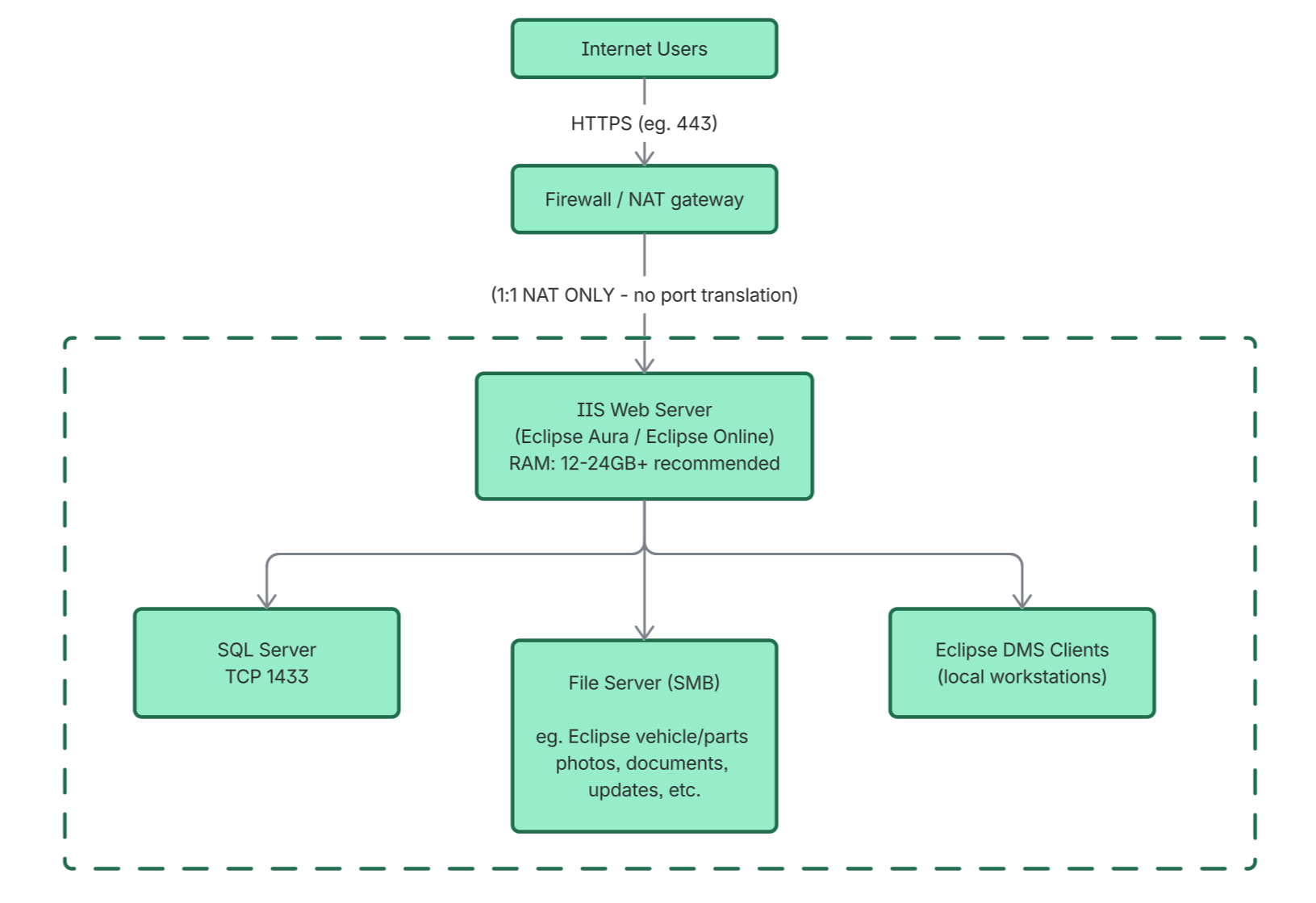
External users access the system over HTTPS via a firewall or NAT gateway, which forwards traffic to IIS. Internal users are expected to operate within the dealership network directly, still using the same hostname and details - this may require hairpin NAT or DNS - A record to be created - router/firewall dependent.
The IIS server sits at the edge of the internal environment and is the only internet-exposed component.
Behind IIS, the dealership network hosts SQL Server and file services. Eclipse DMS desktop clients operate entirely within this same network and connect directly to SQL and SMB shares rather than IIS.
A simplified view of the flow is:
Internet users → Firewall/NAT (1:1 only) → IIS Web Server → SQL + File Services (Dealership Network)
Internal users and DMS clients sit on the dealership network side and access backend services directly where required.
Network Diagram
Key Network Rules
The most important constraint in any Eclipse deployment is that it expects LAN-style connectivity between components.
SQL Server must be reachable from IIS and DMS clients over TCP 1433. File services must be accessible over SMB (TCP 445) via a shared location named “Eclipse Install”.
Only 1:1 NAT is supported for public access. Port translation (for example mapping external 443 to an internal port 12345) is not supported and will break expected application behaviour.
Backend Services
SQL Server handles all transactional and operational data including customers, vehicles, and reporting. It must remain within the dealership network and is not intended for public exposure.
The file server hosts a required SMB share named “Eclipse Install”, which is used for documents, images, and application assets. This must be low latency and treated as a core dependency of the system.
Eclipse Update Service
Eclipse uses a background Windows service for updates. This service must remain fully operational and unrestricted.
Endpoint security tools such as ThreatLocker or strict application control policies must explicitly allow this service. If blocked, updates will fail and render the API unavailable or at worse broken.
Hardware Guidance
Performance is primarily driven by CPU frequency and latency rather than core count.
For IIS servers, modern Intel i5/i7/i9 CPUs with sustained boost clocks above 4.5GHz are strongly preferred. These outperform traditional high-core-count server CPUs in typical Eclipse workloads.
Memory requirements are modest but important for stability. IIS servers should run between 12GB and 24GB of RAM, with 16GB being the typical sweet spot in production environments.
SQL Server benefits from higher memory allocations and fast NVMe storage. File servers should prioritise low latency storage and reliable network throughput.
Deployment Model Summary
A standard production deployment consists of three core components:
-
IIS Web Server handling all web and API traffic
-
SQL Server hosting all application data
-
File Server providing SMB storage for documents and assets
Eclipse DMS clients operate within the dealership network and communicate directly with SQL and file services.
Constraints That Must Be Followed
There are a few non-negotiable requirements:
-
1:1 NAT only (no port translation)
-
SQL must use TCP 1433
-
SMB share must be named “Eclipse Install”
-
IIS must include full http://ASP.NET + ISAPI support
-
Eclipse Update Service must not be blocked
-
Desktop operating systems are not recommended for production use over 5+ users