UBS Knowledge Base
Breadcrumbs

How to create leave without pay

If you want to record leave taken without pay for your employees, you will need to set up the leave type and assign to the employees.


  1. In the Options tab, click Leave.

    https://s3-ap-southeast-2.amazonaws.com/aus-cdn.freshdesk.com/data/helpdesk/attachments/production/51238813634/original/SHjv2-ExF0nrQgyU6T3PLKEy1hEKGkwcSw.png?1753230003

  2. Click New.

    https://s3-ap-southeast-2.amazonaws.com/aus-cdn.freshdesk.com/data/helpdesk/attachments/production/51238813683/original/iIt7qf-0n5rkanJ1uOKQ6MNcL5wwK0wWNA.png?1753230010

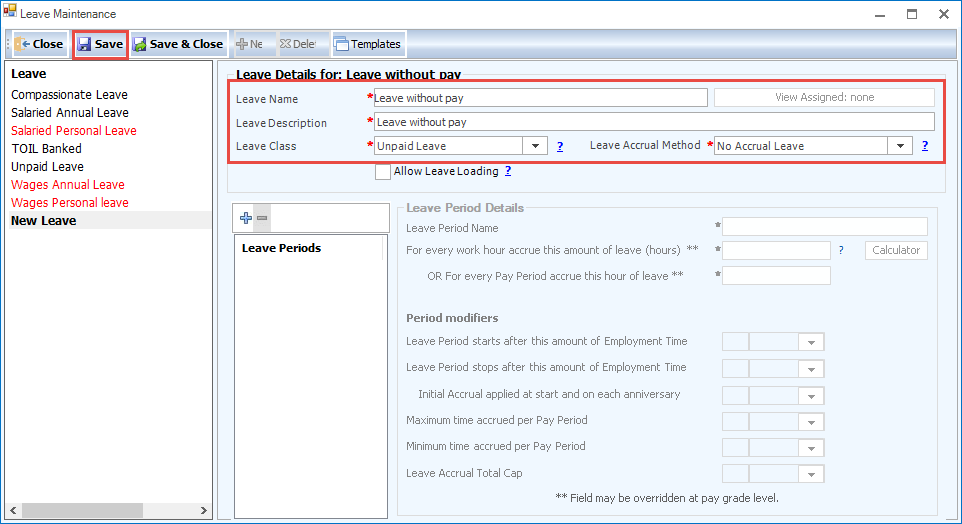
  3. Enter a Leave Name and Leave Description.

  4. Select Unpaid Leave as the Leave Class.

  5. Select No Accrual Leave for the Accrual Method.

  6. Click Save.

    https://s3-ap-southeast-2.amazonaws.com/aus-cdn.freshdesk.com/data/helpdesk/attachments/production/51238813732/original/Tp799cI1bUQMuzguD-pnaoPiyVqW6uFb-g.png?1753230021