
UBS Knowledge Base
Breadcrumbs

How do I change the sequence of parts in a supplier order

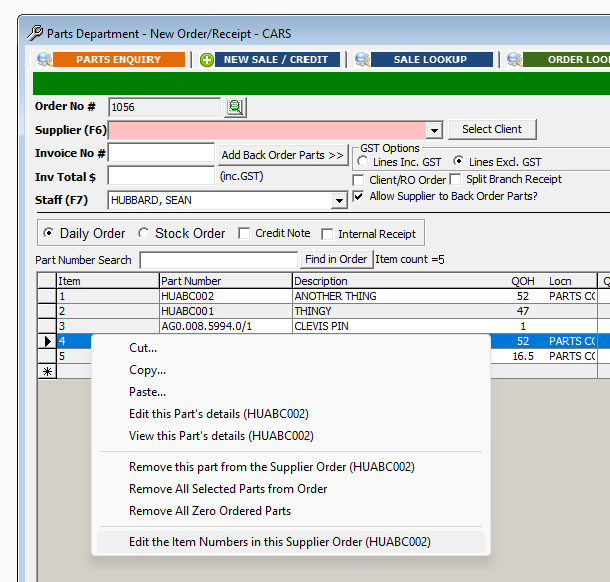
When making a parts order, you can adjust the sequence (or re-order/position parts in the list) by changing items numbers. This might be handy to align to the same sequence as a supplier invoice.


  1. Right Click on the part line, then select Edit the Item Numbers in this Supplier Order.
    https://s3-ap-southeast-2.amazonaws.com/aus-cdn.freshdesk.com/data/helpdesk/attachments/production/51144546779/original/ltEprbWNXnNe_INIv_jRMYIHTcR5kLEyGg.png?1707794606


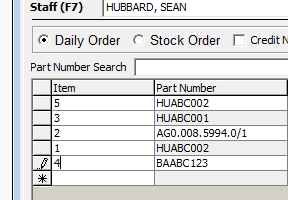
  2. This will allow editing the numbers. Please be aware there is not a great degree of validation. So, numbers can be duplicates or skip a sequence of numbers.
    https://s3-ap-southeast-2.amazonaws.com/aus-cdn.freshdesk.com/data/helpdesk/attachments/production/51144546696/original/19Nhx8EWv9Bc3axK51S79s9CgQSep9Jh6Q.png?1707794591


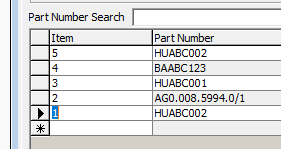
  3. Once you have re-numbered as desired, you can click the column heading to sort (ascending or descending).
    https://s3-ap-southeast-2.amazonaws.com/aus-cdn.freshdesk.com/data/helpdesk/attachments/production/51144547090/original/UEpCCWEms3glqpzNXo5wDQ6SAPbgSek6TQ.png?1707794657