
UBS Knowledge Base
Breadcrumbs

How do I enable/disable invoice rounding for parts cash sales?

Built into Eclipse Parts, rounding to the nearest $0.05 will happen automatically for cash sales. This can also be enabled/disabled for account customers regardless of payment type.


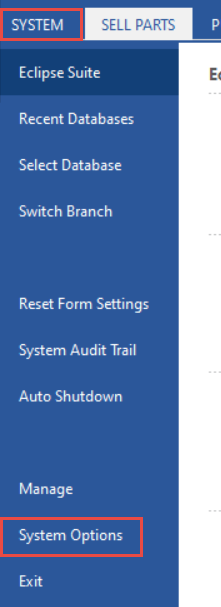
  1. Click System in the top left of the screen, then System Options.
    https://s3-ap-southeast-2.amazonaws.com/aus-cdn.freshdesk.com/data/helpdesk/attachments/production/51238800816/original/OxHSSmFPXQe4hxa6mf5cnUVtl8x3Qb2Njw.png?1753228293

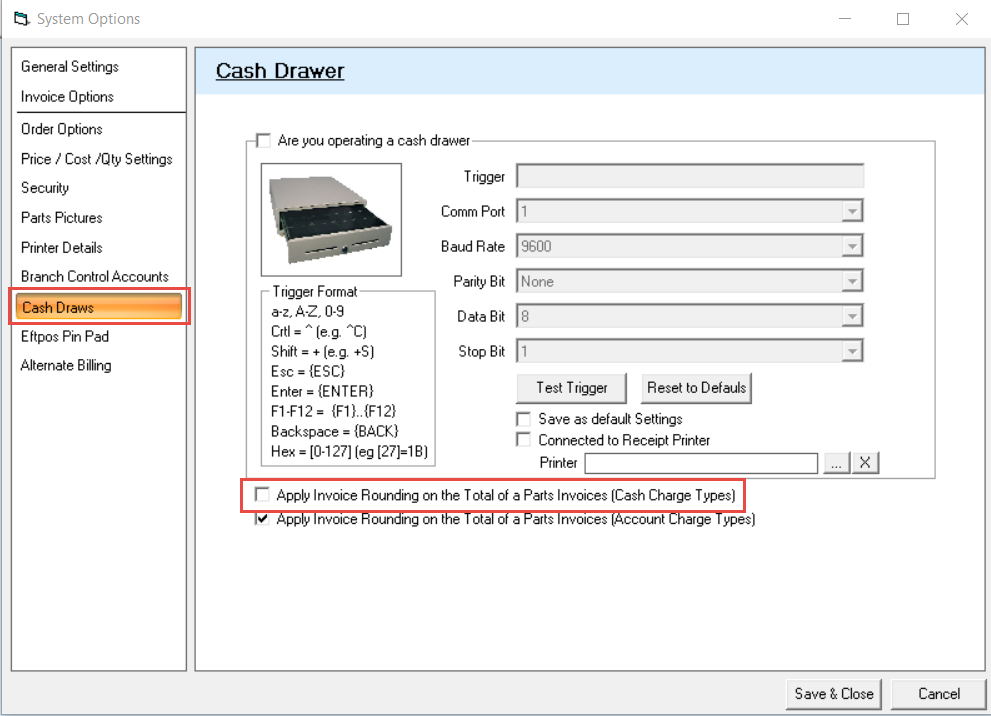
  2. Navigate to the Cash Drawer tab.

  3. Tick/Untick the box for Apply Invoice Rounding on the Total of a Parts Invoices (Cash Charge Types) as required.
    https://s3-ap-southeast-2.amazonaws.com/aus-cdn.freshdesk.com/data/helpdesk/attachments/production/51238800771/original/TgKs9O0Dg2odBhzsYYREB4pe3KOBCD1o5Q.png?1753228287