
UBS Knowledge Base
Breadcrumbs

How to add extra references to repair orders

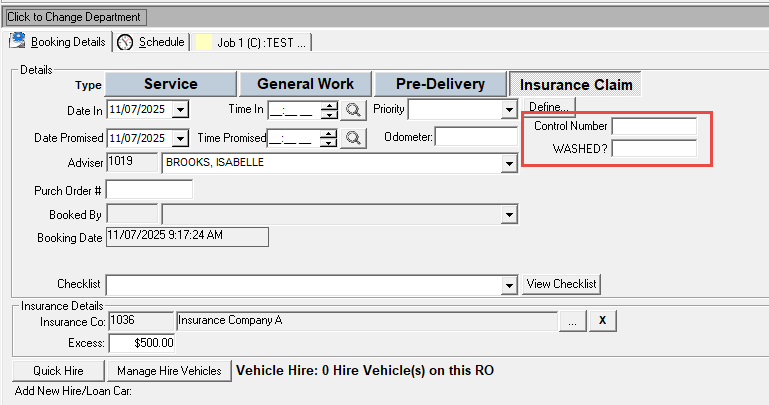
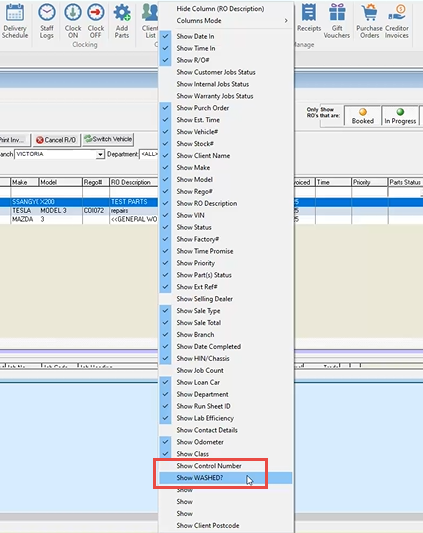
Up to 5 extra references can be entered against a repair order, which can also be additional columns in the RO list screen. These can be used for any sort of reference, such as washed, or key number.
https://s3-ap-southeast-2.amazonaws.com/aus-cdn.freshdesk.com/data/helpdesk/attachments/production/51238273274/original/AsVQT3WY1BNucMqpKw-dQ_ezeWnnH_H7IQ.png?1753055043


https://s3-ap-southeast-2.amazonaws.com/aus-cdn.freshdesk.com/data/helpdesk/attachments/production/51238273330/original/PjvsAiwTnFMSxftK7WbMcSSMzk1uBbChPw.png?1753055052


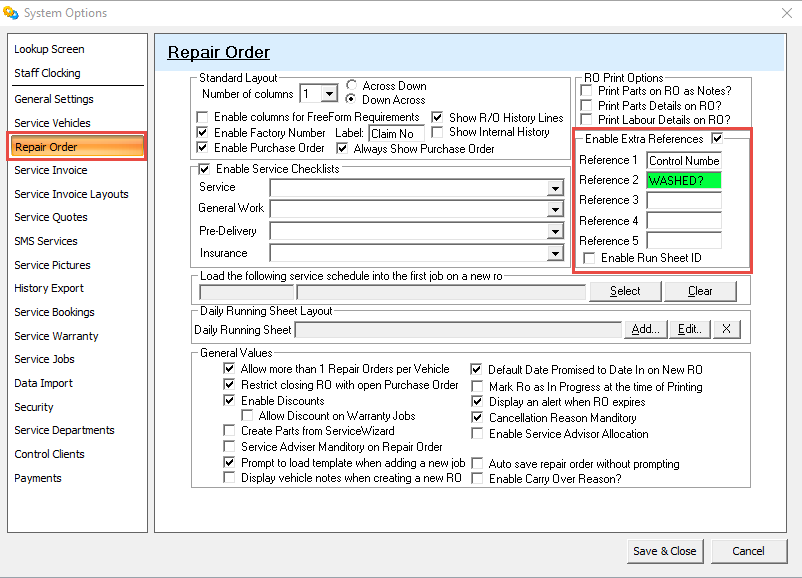
To turn on or change the references, navigate to the Service System Options and enter in the Repair Order tab.

https://s3-ap-southeast-2.amazonaws.com/aus-cdn.freshdesk.com/data/helpdesk/attachments/production/51238273832/original/z3U6EZj5p35IbL7Qej2m4zzD-emZwIJyqQ.png?1753055116