
UBS Knowledge Base
Breadcrumbs

How to add a trade in payout

If there is a finance payout on a trade in, there are 2 ways to enter this, depending on the status of the trade in. If the trade in is not being acquired until the deal is delivered, it is considered a normal trade in. If you are acquiring the trade in prior to the sale being delivered, it is considered a pre-trade deposit. This guide will cover both methods.


Normal Trade In Method


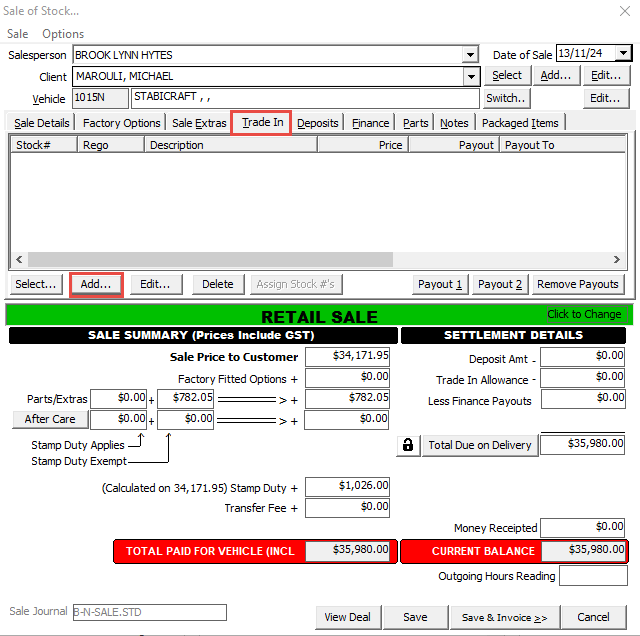
  1. In the Trade In tab on the sale, click Add.

    https://s3-ap-southeast-2.amazonaws.com/aus-cdn.freshdesk.com/data/helpdesk/attachments/production/51221553739/original/HxPyhqVc6ZE6ugwUnbyz4EQi2FyLvNNJ9w.png?1745890933

  2. Enter Trade In details, ensure the Status is Normal.

    https://s3-ap-southeast-2.amazonaws.com/aus-cdn.freshdesk.com/data/helpdesk/attachments/production/51221553985/original/hbTOKS2IMyu7ZggY7Ed3dqhAzDag2LG1Wg.png?1745890960

  3. Once the trade in has been saved, click Payout 1.

    https://s3-ap-southeast-2.amazonaws.com/aus-cdn.freshdesk.com/data/helpdesk/attachments/production/51221554159/original/laSku_dQvElnsf35zYvvswFMrI3TOR18AA.png?1745890984

  4. Enter the Finance Company, Payout Amount, and Payout Reference.

  5. Click OK.

    https://s3-ap-southeast-2.amazonaws.com/aus-cdn.freshdesk.com/data/helpdesk/attachments/production/51221554486/original/ubHCtbP0F4PbWF2NsSt76RYbC1A4JrZYDw.png?1745891031


Pre-Trade Deposit Method


  1. In the Trade In tab on the sale, click Add.
    https://s3-ap-southeast-2.amazonaws.com/aus-cdn.freshdesk.com/data/helpdesk/attachments/production/51221553844/original/juWIxngEry2FdXi2FZkpyJMqkNjR6KsfPw.png?1745890945

  2. Enter Trade In details, ensure the Status is Pre-Trade (Deposit).

  3. Click Payout in the bottom left of the stock screen.

    https://s3-ap-southeast-2.amazonaws.com/aus-cdn.freshdesk.com/data/helpdesk/attachments/production/51221554743/original/AAGWvIaHGF7BlLQ019629fPZa3AZ4L4r0Q.png?1745891051

  4. Enter Payout Client, Payout Reference, and Amount.

  5. Click OK.

    https://s3-ap-southeast-2.amazonaws.com/aus-cdn.freshdesk.com/data/helpdesk/attachments/production/51221554880/original/QbHYOpBk-OljH--HvFMKoeER43pIHxt-HA.png?1745891069


Related Articles


How to add a trade in on a sale