
Vehicle costs are created and added on to stock unit to represent additional costs associated with acquiring the stock, such as transport fees or registration costs.
-
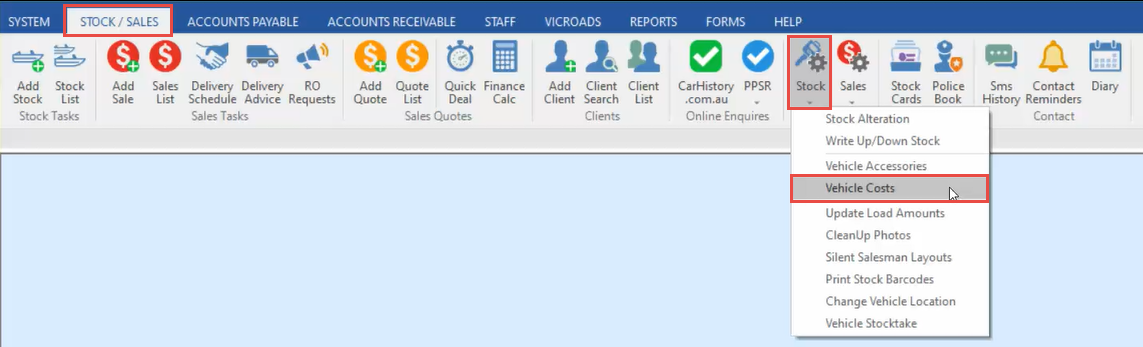
In the Stock/Sales tab, click Stock, then Vehicle Costs.
-
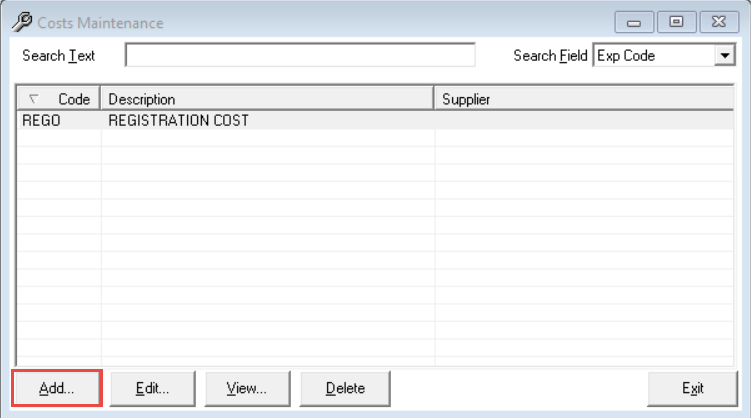
Click Add.
-
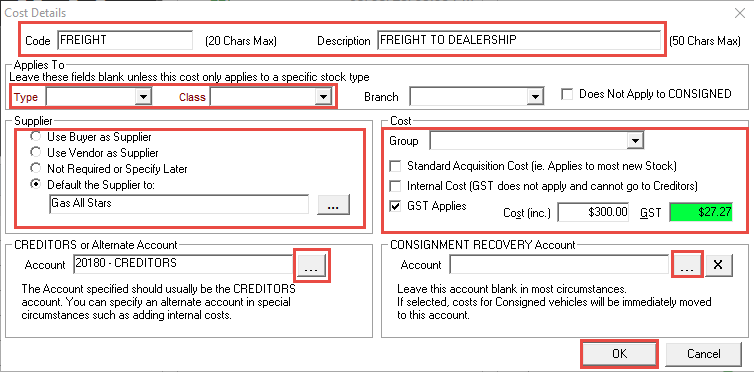
Enter a Code and Description for the cost (the code will need to be unique).
-
You can select a vehicle Type and Class if the cost is specific to that item, otherwise leave blank if you wish to apply the cost to any stock item.
-
Select a Supplier Option for the cost, whether you specify a supplier now or later, or use the buyer or vendor as the supplier.
-
If you use cost groups, select a Cost Group this cost belongs to.
-
Select your Cost Options regarding GST, and enter a Cost Price.
-
Select your Creditors Account or Alternate Account if applicable.
-
Select a Consignment Recovery Account if applicable.
-
Click OK.
Related Articles