UBS Knowledge Base
Breadcrumbs

How to bank undeposited cash in Aura

Cash banking is done in 2 steps; the first is entering the cash received into an undeposited cash bank GL account, the second is taking the cash out of that first account and entering into your business bank account at the time the cash is taken to a physical bank branch.


Banking the cash into an undeposited cash account

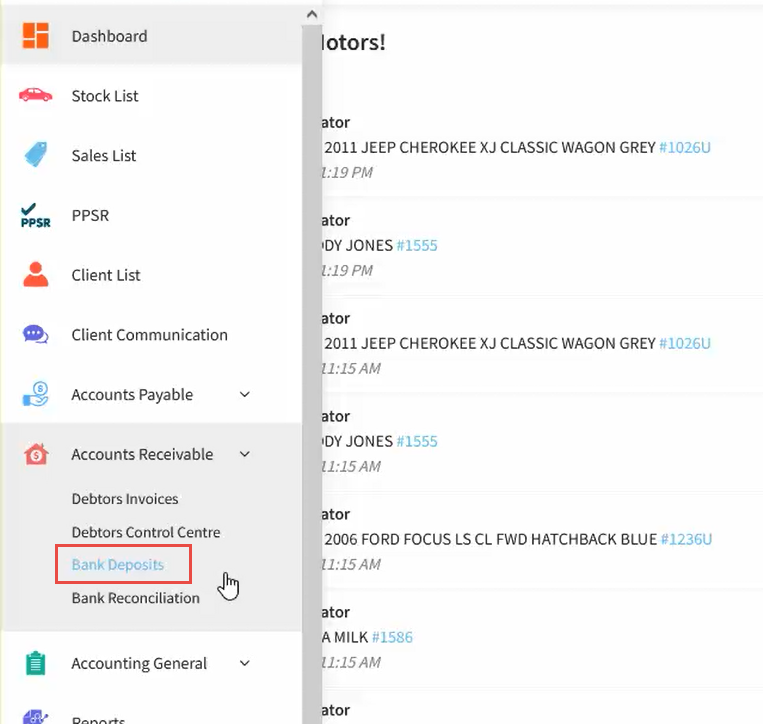
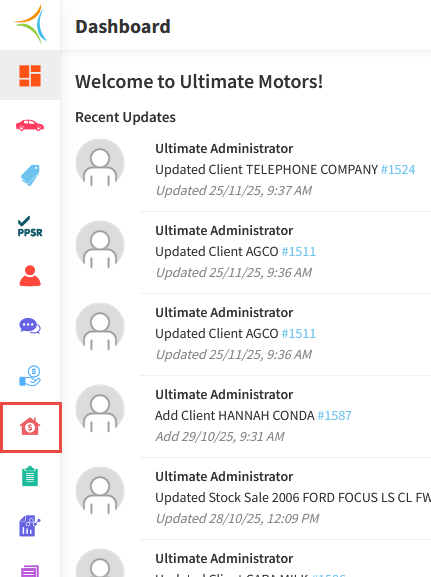
  1. From the Dashboard, hover over the Accounts Receivable icon.
    https://s3-ap-southeast-2.amazonaws.com/aus-cdn.freshdesk.com/data/helpdesk/attachments/production/51265694737/original/zd_qgrLDDbwkJtHJ09L_yJHT1c_u6A_vSQ.png?1764196297

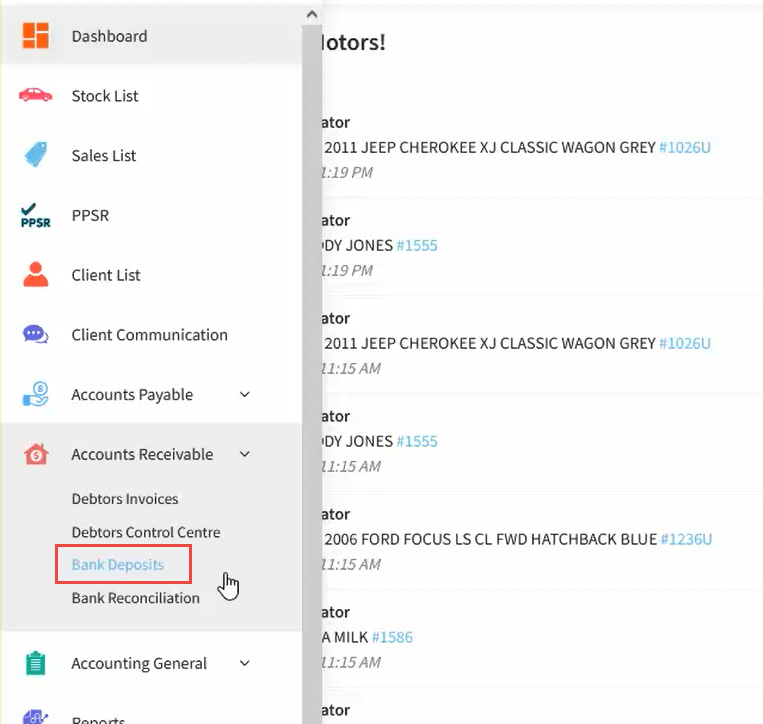
  2. Click Bank Deposits.

    https://s3-ap-southeast-2.amazonaws.com/aus-cdn.freshdesk.com/data/helpdesk/attachments/production/51265694826/original/bxMdoT_f37ZVNE_Ap59haIYjyr20uHwSrw.png?1764196310

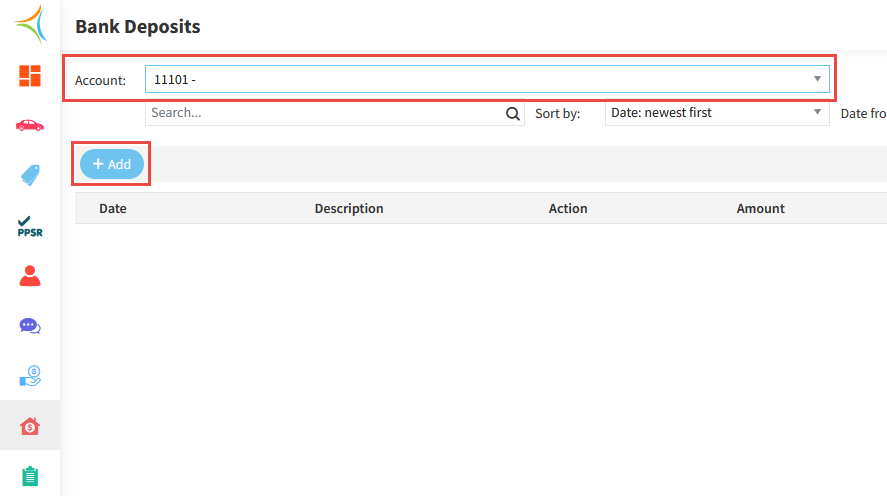
  3. Select your Undeposited Cash account, then click Add.
    https://s3-ap-southeast-2.amazonaws.com/aus-cdn.freshdesk.com/data/helpdesk/attachments/production/51265699276/original/4a2ePZ168eovJ1Qjbc1EVZcD0CEFkD7cDg.png?1764197065

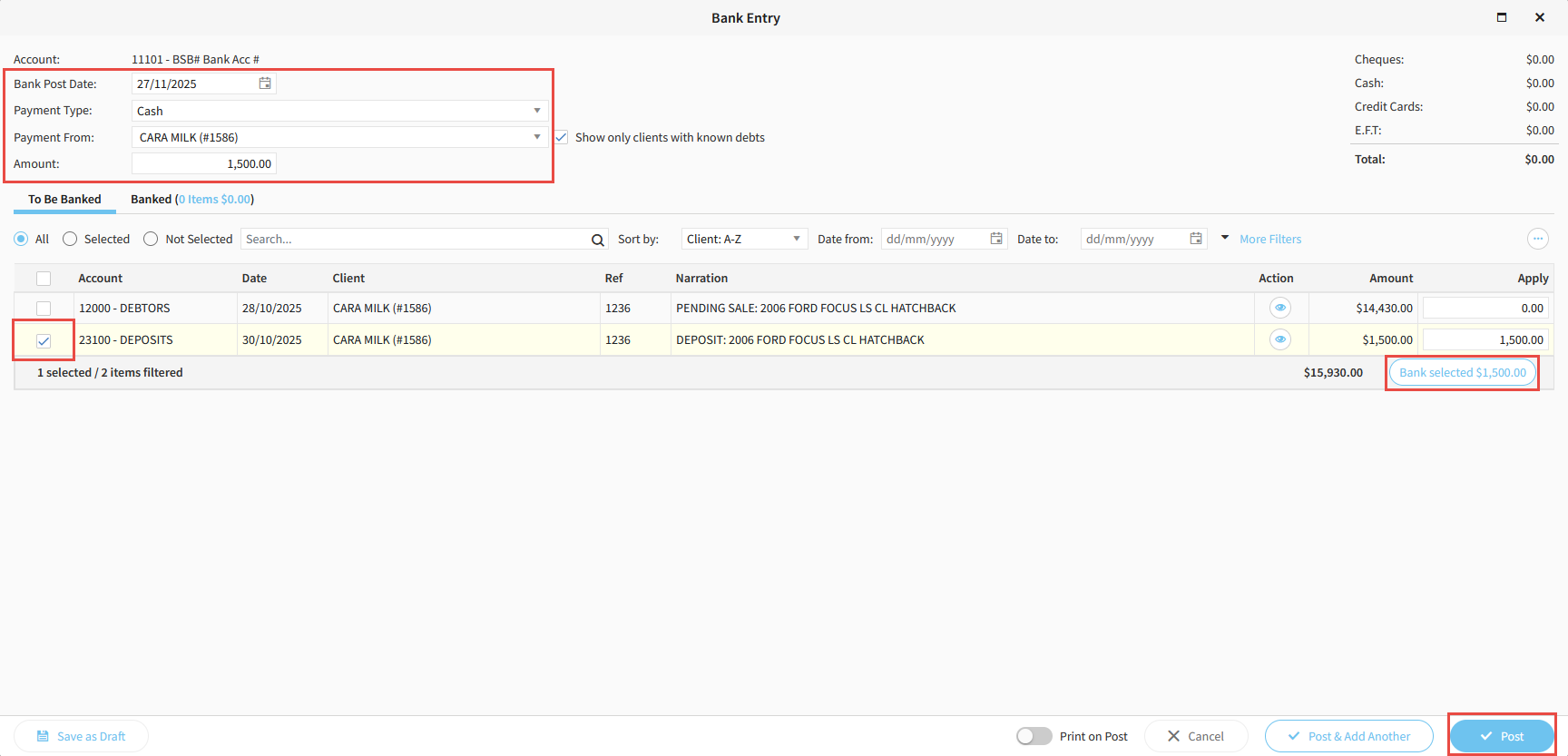
  4. Enter the Date the cash was received.

  5. Select the Payment Type as Cash.

  6. Enter the Client and the Amount.

  7. Tick the corresponding Payment Line, then click Bank Selected, then Post.
    https://s3-ap-southeast-2.amazonaws.com/aus-cdn.freshdesk.com/data/helpdesk/attachments/production/51265699369/original/Z63cgM6mR9c4TEDPrPNKQgnT_LFiNRTIBg.png?1764197078


When you physically take the cash to the bank

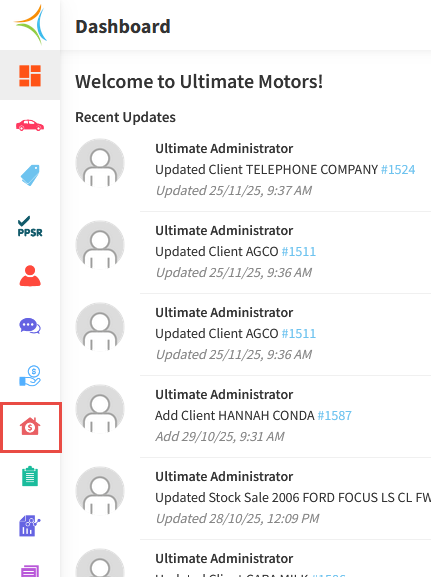
  1. From the Dashboard, hover over the Accounts Receivable icon.
    https://s3-ap-southeast-2.amazonaws.com/aus-cdn.freshdesk.com/data/helpdesk/attachments/production/51265698770/original/bWvQLkHpMarynB0P9vNYttJNhYBAkhOZqA.png?1764196982

  2. Click Bank Deposits.

    https://s3-ap-southeast-2.amazonaws.com/aus-cdn.freshdesk.com/data/helpdesk/attachments/production/51265698916/original/eT5yv1pT5Fz-wWVLZ2ba17vZRZUNEUNKgA.png?1764196995

  3. Select your Undeposited Cash account, then click Add.

    https://s3-ap-southeast-2.amazonaws.com/aus-cdn.freshdesk.com/data/helpdesk/attachments/production/51265699450/original/YLiIMLc4OpAgtsppKQSXcwxNNypg0vJvqw.png?1764197090

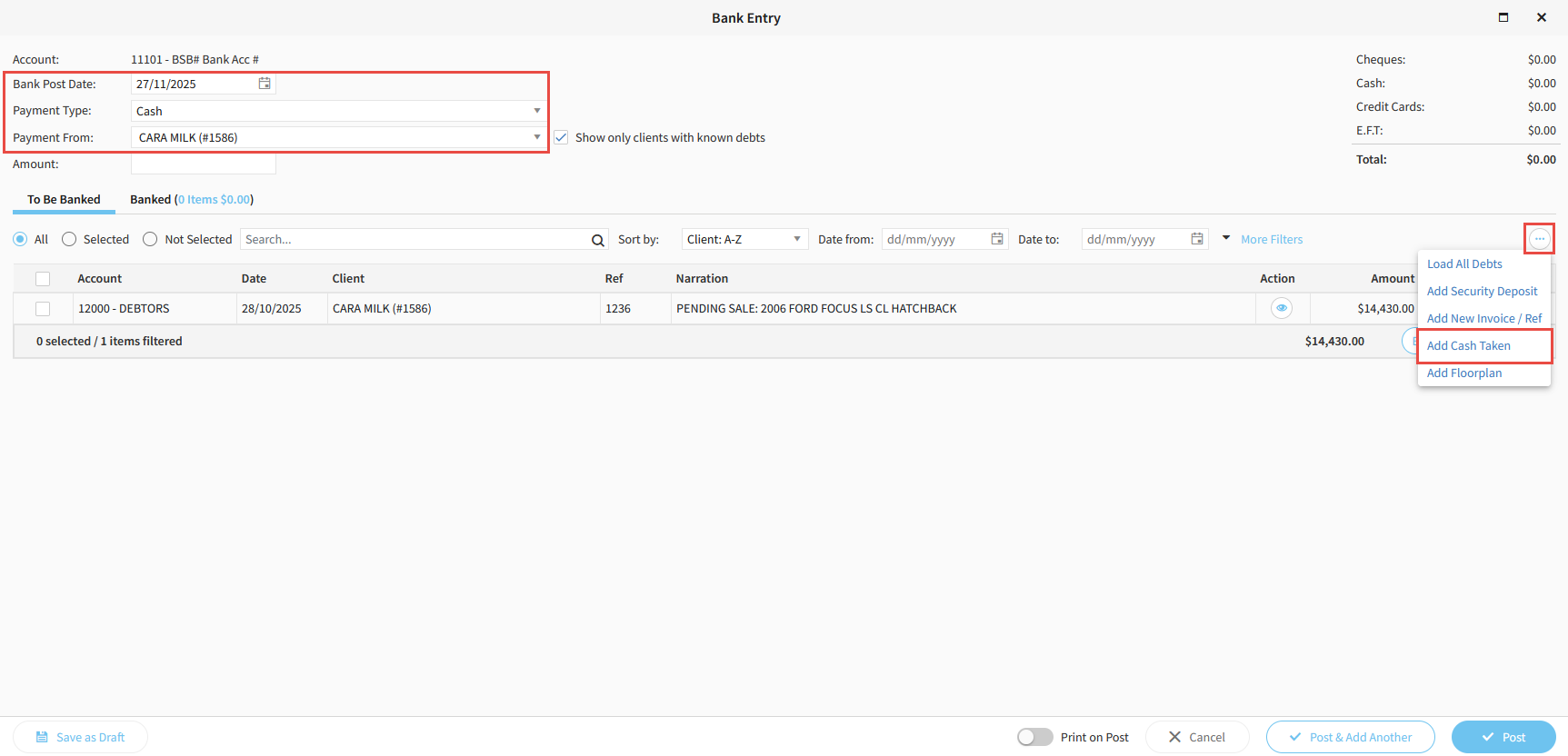
  4. Enter the Date you are depositing the cash into the bank.

  5. Select the Client.

  6. Click the 3 dots on the right hand side, then click Add Cash Taken.
    https://s3-ap-southeast-2.amazonaws.com/aus-cdn.freshdesk.com/data/helpdesk/attachments/production/51265699517/original/_sr3I9CKPKUinRilmhYlxk1CVriH2XK9PA.png?1764197103

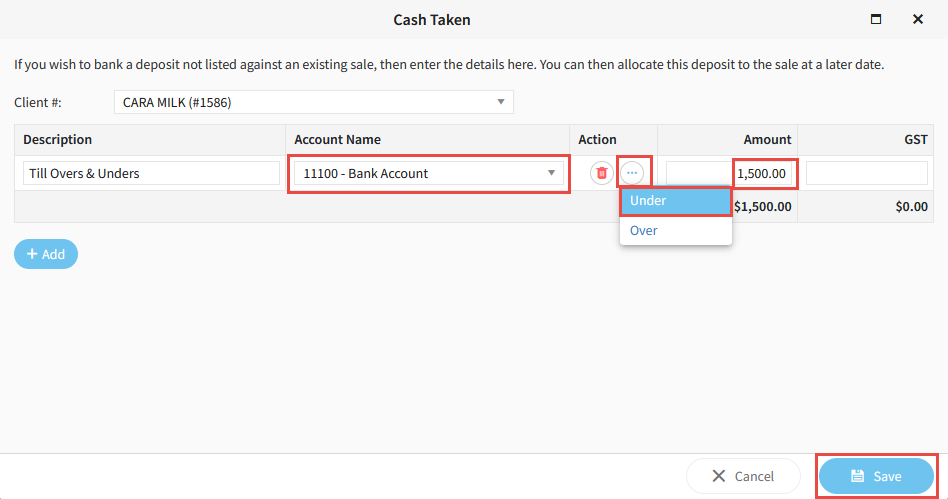
  7. Select the Bank Account that you are depositing the cash into.

  8. Click the 3 dots and select Under.

  9. Enter the Amount, then click Save.

    https://s3-ap-southeast-2.amazonaws.com/aus-cdn.freshdesk.com/data/helpdesk/attachments/production/51265699578/original/3AHES1drLO7g1yeT7paOwZsDcN33OBMREg.png?1764197112

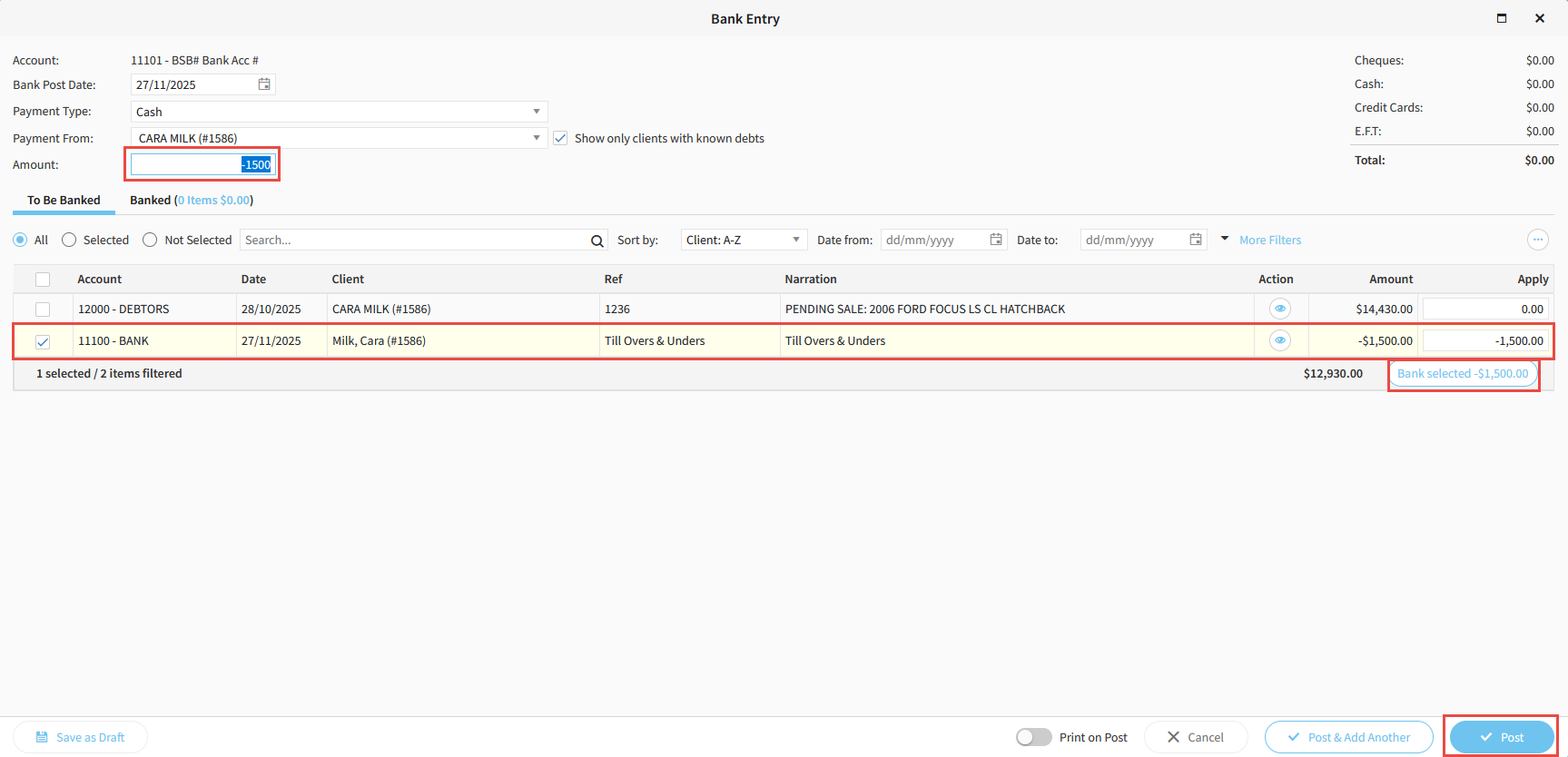
  10. Enter a corresponding Negative Amount up the top, then click Bank Selected, then Post.
    https://s3-ap-southeast-2.amazonaws.com/aus-cdn.freshdesk.com/data/helpdesk/attachments/production/51265699619/original/3Al_XyOihUo9K3FHu70ZnVUxpoOW5f5Qmg.png?1764197121

  11. The cash amount has now been removed out of your undeposited cash account and is sitting on the bank rec for your main bank account.

    https://s3-ap-southeast-2.amazonaws.com/aus-cdn.freshdesk.com/data/helpdesk/attachments/production/51265699657/original/UWVM2zc3SvxoBn8L4gUeASmNhHVibhNPHg.png?1764197129


Related Articles


How to create a debtors invoice in Aura


How to bank EFTPOS receipts in Aura


How to receipt money deposited into your bank account in Aura


How to complete your bank reconciliation in Aura