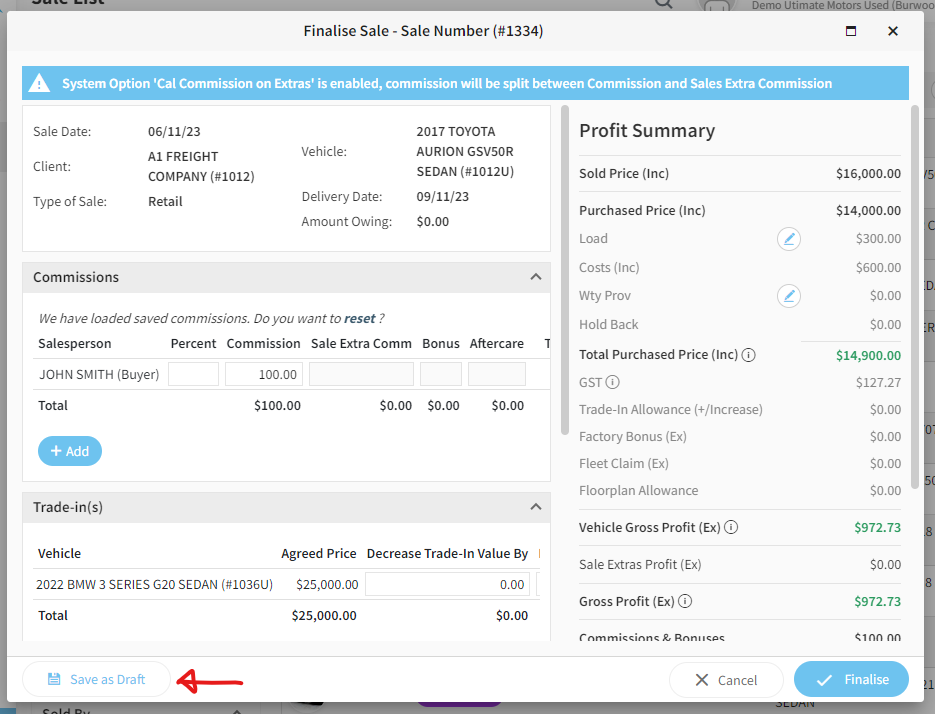
Once a vehicle sale has been finalised, any entered commissions will be reflected in select profit reports and the corresponding vehicle stock card. However, once the sale is finalised most of the sale and vehicle information becomes locked and does not allow updating.
Some dealerships would like to enter expected commission and have these reflected in profit reports or costs against a vehicle but may continue to make changes to a sale or vehicle.
Rather than change the sales status to Finalised, change to Finalised Draft. This will then reflect estimated commissions on stock cards, and show in the following reports (if the option "Inc. Est. Commission" is enabled in the report):
-
Profit Report
-
Profit Summary
Further report will be given the "Inc. Est. Commission" option in the future.
How to change sales to Finalised Draft
-
Once the sales status has been changed to Delivered, click to Finalise as you would normally.
-
Make any changes and include desired sales commissions.
-
Before saving, do NOT click the "Finalise" but rather "Save as Draft" button on the left.